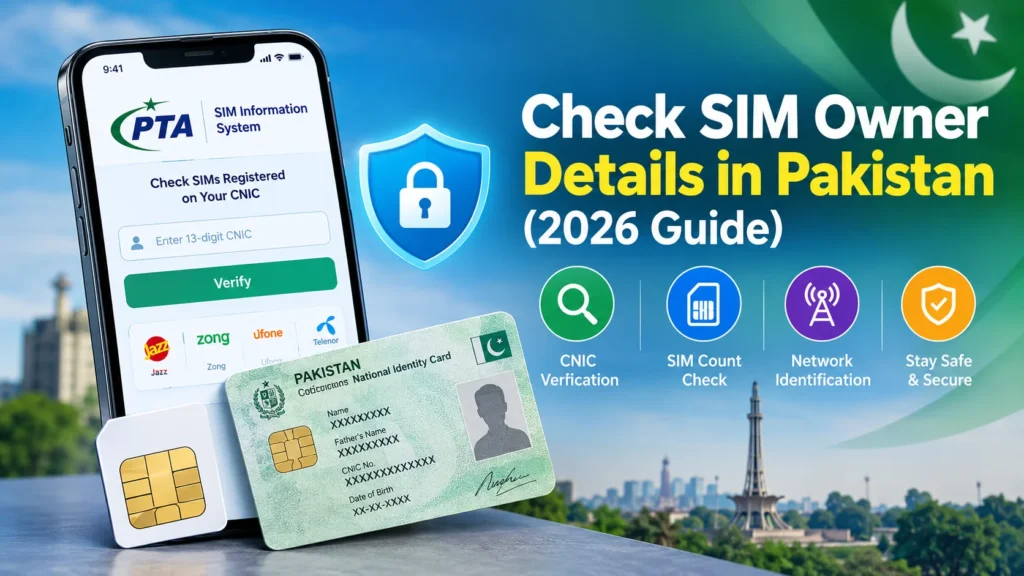
If you want to check SIM owner details in Pakistan, the correct method depends on what you need to verify. You can check how many SIM cards are registered against your own CNIC through the official PTA SIM Information System or by sending your CNIC number to 668, with SMS charges potentially applying.
However, checking the registered owner of another person’s mobile number is different. The official public portal does not provide a person’s name, CNIC, or home address simply from a phone number. Avoid websites that promise unrestricted access to private subscriber records.
This guide explains the available verification methods, what information they provide, how to identify a mobile network, and what to do if you discover an unauthorized SIM registration.
For Calculate your age then visit This site:https://agemeter.online/
What Does Check SIM Owner Details Mean?
A SIM owner details check means verifying information associated with a mobile SIM card or its registration.
In Pakistan, people generally search for SIM ownership information for three reasons:
- To confirm that their own SIM is registered correctly.
- To check the number of SIMs associated with their CNIC.
- To identify the mobile network associated with an unfamiliar number.
These are different tasks, and they do not all provide the same information.
For example, checking SIMs against your CNIC can help you identify unexpected registrations. Checking a number’s network can tell you which operator currently handles it, but it does not establish the subscriber’s identity.
What information can you check?
| Information | Available method |
| Number of SIMs on your CNIC | PTA SIM Information System or SMS 668 |
| Mobile network of a number | Official network identification method |
| Registration of your own SIM | Relevant mobile operator’s verification process |
| Another person’s private subscriber details | Not available through the public PTA portal |
| Unauthorized SIM registration | Verify your CNIC and contact the relevant operator |
The distinction matters because some unofficial websites advertise access to names, addresses, CNIC numbers, or other sensitive information. Do not assume such claims are accurate, authorized, or safe.
How to Check SIM Owner Details Online in Pakistan
The most reliable starting point is the official SIM Information System. It helps you check SIM registrations associated with your own identity.
Method 1: Check SIMs Through the PTA SIM Information System
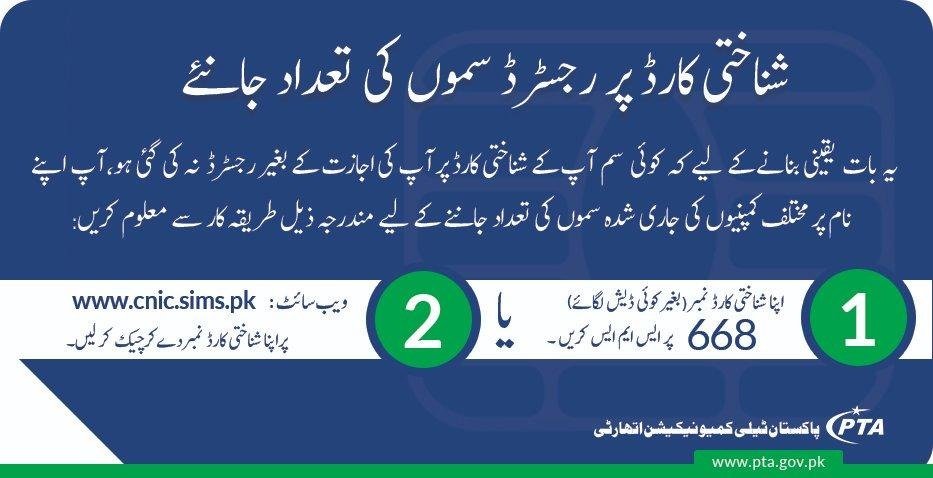
Follow these steps to check SIMs registered against your CNIC.
- Open the official SIM Information System.
- Select the CNIC option.
- Enter your 13-digit CNIC number without dashes.
- Complete the verification shown on the website.
- Submit the form and review the displayed information.
The portal provides an operator-wise count of SIMs registered against the CNIC you submit. Its published instructions also provide a separate Foreign ID option for foreign nationals.
Important: This is a registration-count service, not a public reverse-phone lookup database. Do not expect it to reveal another subscriber’s private identity.
Method 2: Check SIM Registration Through SMS 668
You can also use the SMS method recommended by the Pakistan Telecommunication Authority.
- Open the messaging application on your phone.
- Type your own 13-digit CNIC number without spaces or dashes.
- Send the message to 668.
- Review the reply showing SIM registration counts associated with your CNIC.
PTA has advised consumers to use this service or its online portal to verify their SIM registrations. SMS charges may apply, depending on the applicable service terms.
If the count appears incorrect, contact the relevant network operator through its official customer support channel.
Privacy reminder: Only submit your own CNIC or information you are authorized to use. Avoid posting your CNIC publicly or sharing screenshots that expose your identity details.
Method 3: Identify the Mobile Network of a Number
Sometimes, you do not need the owner’s name. You simply want to know whether a number belongs to Jazz, Zong, Ufone, or another network.
The SIM Information System website currently displays instructions for checking a number’s network by sending a message in this format:
N 03xx3456789
Replace the example with the complete mobile number and send the message to 76367. The website lists a charge of PKR 2 plus applicable tax. Confirm the current instructions and charges before using the service.
This method identifies the network, not the registered subscriber’s name or address.
Also remember that mobile number portability allows a number to move between operators. Therefore, the original prefix of a number may not reliably identify its current network.
Method 4: Verify Your Own SIM With Your Mobile Operator
If you have a SIM card in your phone and want to confirm that it is registered correctly, contact the relevant operator.
You can:
- Visit an official service centre or franchise.
- Ask customer support about the operator’s current ownership-verification process.
- Follow the operator’s identity verification requirements.
- Request help if your registration information appears incorrect.
Bring your original identification document if requested. The operator may require additional authentication before discussing subscriber records or processing a change.
Use the official website of your mobile operator to find current contact information and service locations.
Can You Check a SIM Owner Name by Mobile Number?
This is one of the most common questions behind searches for check SIM owner details.
The short answer is that entering any Pakistani mobile number into the public PTA SIM Information System will not reveal the registered owner’s name.
The official portal is designed to show the number of SIMs associated with a CNIC, while its network identification instructions concern the operator of a number. Neither should be confused with access to private subscriber records.
If an unknown number calls you, consider these safer options:
- Ask the caller to identify themselves.
- Check whether the number is associated with a business through its official website.
- Use your phone’s built-in spam detection or a reputable caller-identification service, understanding that labels can be inaccurate.
- Block the number if the calls are unwanted.
- Report threats, fraud, or harassment through appropriate official channels.
Do not treat a name shown by an unofficial lookup service as verified proof of identity.
Why do some websites claim to reveal names and addresses?
Some third-party websites advertise SIM databases that supposedly reveal a subscriber’s name, CNIC, address, or other personal information.
A website’s claim does not establish that its data is authentic or that it is authorized to disclose it. Information may be outdated, inaccurate, improperly obtained, or associated with the wrong person.
Avoid submitting sensitive information to unverified services, paying for supposedly confidential records, or downloading unknown apps to perform a SIM owner lookup.
For legitimate verification, start with the official telecom channels.
How to Check All SIMs Registered on Your CNIC
Checking your CNIC periodically is a practical way to monitor your mobile registrations.
Pakistan’s SIM Information System allows users to check the total number of SIMs registered against their CNIC, with counts displayed by operator. PTA has encouraged consumers to ensure that only required and actively used SIMs remain registered against their identity.
Step-by-step CNIC SIM verification
- Visit cnic.sims.pk.
- Enter your CNIC without dashes.
- Complete the displayed verification.
- Submit the form.
- Review the operator-wise counts.
- Compare the results with the SIM cards you currently use or have legitimately registered.
For example, suppose the result shows two SIMs under one operator, but you believe you have only one. That difference is a reason to investigate, not automatic proof of fraud. You may have an older registration or another legitimate connection you have forgotten.
Contact the relevant operator to establish which registrations are associated with your identity and what action is available.
What if you find an unknown SIM on your CNIC?
Do not ignore an unexpected registration.
- Contact the mobile network operator concerned.
- Explain that you do not recognize the SIM registration.
- Complete any identity checks required by the operator.
- Request investigation and blocking or disowning of the unauthorized registration, as applicable.
- Keep any complaint reference or confirmation you receive.
- Recheck your registration status after the operator has processed the request.
PTA has specifically advised consumers who discover SIMs issued without their knowledge or consent to approach the relevant service provider immediately.
If you suspect identity theft, financial fraud, or a related cybercrime, preserve relevant messages and records and seek guidance from the appropriate official reporting authority.
Difference Between 668, 76367, and Other SIM Check Methods
Different services answer different questions. Using the wrong method can lead to confusion.
| Method | Main purpose | What to expect |
| PTA website | Check SIMs against your CNIC | Operator-wise registration counts |
| SMS 668 | Check SIM registrations against your CNIC | Registration-count response; charges may apply |
| SMS 76367 | Identify a mobile network | Network identification, subject to service availability |
| Mobile operator support | Verify or resolve your own SIM registration | Assistance after required authentication |
| Unofficial SIM lookup websites | Varies by provider | Accuracy and authorization may be uncertain |
The safest choice depends on your purpose. If you are checking your own CNIC, start with the PTA portal or 668. If you are dealing with an unknown caller, network identification alone will not prove who the caller is.
Do not assume that every shortcode advertised online is official or currently active.
Is Checking SIM Owner Details Legal in Pakistan?
It is important to distinguish between checking your own registration and attempting to obtain another person’s confidential subscriber information.
Verifying the SIMs registered against your own CNIC through the official service is an established consumer verification method. PTA also emphasizes responsible SIM registration and advises customers to contact their operators about registrations they do not recognize.
By contrast, attempting to access confidential subscriber records without authorization raises privacy and legal concerns. The fact that a website offers a search form does not mean that every type of information it promises is lawfully available.
For a specific legal concern, consult the applicable Pakistani law or a qualified legal professional. Do not rely on social media posts or anonymous websites for definitive legal advice.
How to protect your SIM registration information
Follow these practical precautions:
- Never share your CNIC photograph or full identity details with an unverified website.
- Do not disclose SMS verification codes or account PINs to strangers.
- Purchase and register SIMs through authorized channels.
- Check your CNIC’s SIM count periodically.
- Report suspicious or unrecognized registrations promptly.
- Keep your phone and messaging accounts protected with appropriate security settings.
A small amount of caution can help reduce the risk of identity misuse.
How to Report an Unauthorized SIM or Suspicious Caller
The correct response depends on the issue.
If a SIM is registered against your CNIC without permission
Contact the relevant mobile operator first and request an investigation. Explain that the registration is unfamiliar and ask about the official process for blocking or removing it.
If the operator does not resolve your complaint, check the Pakistan Telecommunication Authority website for its current complaint procedure.
If someone is threatening or harassing you
Save relevant call details, messages, screenshots, and dates. Block the number if appropriate and report the matter through the relevant official channel.
Do not publish the alleged caller’s personal information online or pay a third party to obtain confidential records.
If you suspect financial fraud
Contact your bank or payment provider immediately if money or financial accounts are involved. Use official contact details rather than phone numbers supplied by the suspicious caller.
For potential cybercrime, consult the relevant official government reporting service and follow its current instructions.
Common Problems With Online SIM Verification
Sometimes a SIM check does not produce the result you expect. Here are common reasons and practical next steps.
The PTA website is not working
The service may be temporarily unavailable, or your internet connection or browser may be causing a problem.
Try refreshing the official website, checking your connection, or returning later. You can also use the SMS 668 method if available.
The verification code is incorrect
Re-enter the information carefully and follow the verification prompt. Do not repeatedly submit personal information to unofficial websites claiming to provide the same service.
The SIM count looks wrong
An unexpected count does not automatically mean someone has stolen your identity. Contact the relevant operator to clarify the registration and ask how to correct any error.
You cannot identify the owner of a number
The public CNIC portal is not designed to disclose another subscriber’s private details. If the number is associated with threats, fraud, or harassment, use the appropriate reporting process instead.
The SMS service does not reply
Check the destination number, message format, available balance, and current service instructions. If the problem continues, contact the relevant operator or consult the official PTA resources.
Conclusion
Knowing how to check SIM owner details in Pakistan can help you protect your identity and manage your mobile registrations responsibly. In 2026, the recommended starting points for checking SIMs registered against your own CNIC are the PTA SIM Information System and SMS 668.
Remember that checking a SIM count, identifying a network, and verifying a subscriber’s identity are three different things. The public portal does not provide unrestricted access to another person’s private registration details.
If you discover an unfamiliar SIM on your CNIC, contact the relevant mobile operator promptly. Use official services, protect your personal information, and avoid unverified websites promising confidential subscriber records.
Frequently Asked Questions
Q1. How can I check SIM owner details online in Pakistan?
Visit cnic.sims.pk to check SIM counts registered against your own CNIC. The portal does not reveal another person’s private subscriber information from a mobile number.
Q2. Can I check a SIM owner’s name by mobile number?
The public PTA SIM Information System does not provide a registered owner’s name simply by entering a mobile number. For your own SIM, contact the relevant operator and follow its verification process.
Q3. How can I check how many SIMs are registered on my CNIC?
Enter your 13-digit CNIC without dashes on the official SIM Information System website, complete verification, and submit the form. Alternatively, send your CNIC without dashes to 668; SMS charges may apply.
Q4. Is the PTA SIM Information System free?
The online portal is available for checking SIM registration counts. The SMS method to 668 may incur charges. Check the official service information for current terms.
Q5. What should I do if an unknown SIM is registered on my CNIC?
Contact the relevant mobile operator, request an investigation, and ask about the process for blocking or removing an unauthorized registration. Keep your complaint reference and follow up until the matter is resolved.
Q6. Can I find someone’s address using their mobile number?
The official public SIM Information System does not provide a subscriber’s private address through a mobile-number search. Avoid websites claiming to reveal confidential addresses without authorization.
7. How do I check which network a Pakistani number uses?
The SIM Information System website lists a network-identification SMS service using 76367. Follow the current instructions on the official portal and verify the applicable charges. Network identification does not establish the owner’s identity.
8. Is it safe to use third-party SIM owner lookup websites?
Be cautious. Such websites may provide inaccurate information or request sensitive data without adequate justification. Prefer official telecom channels for SIM registration verification and never share your CNIC or verification codes with an untrusted service.